Adding a visual query builder to an existing ASP.NET Core app


Sooner or later someone asks for it: "let users build their own reports". The app it is meant for already exists. It has a DbContext with dozens of entities, cookie or Identity sign-in, a layout, and rules about who may see which rows. This article adds a visual query builder to an app like that: one data model built from the context you already have, one API endpoint and one page. Most of it is about the part that matters in an existing app, which is keeping users inside the permissions the app already enforces.
The problem
A query builder looks like a UI problem. In a real app it is mostly a permissions problem.
Users want to pick fields, add conditions ("orders over 1,000, shipped to Germany, last quarter"), group, sort and export, without asking a developer each time. The usual ways to give them that each break something:
- Build it yourself. A condition editor, a column picker, a SQL generator that handles joins, types, dates and the dialect of your database, plus saved queries and export. That is months of work, and the SQL generator is where the bugs live.
- Point a BI tool at the database. It works, but outside your app: a second login, a second set of permissions to keep in sync, and every rule your app enforces in code (a sales rep sees only their own orders, a tenant only their own tenant) has to be rebuilt there or is simply gone.
- A fixed set of report pages. Safe, and never quite the report anyone asked for.
What an existing app needs is a query builder that lives inside it: on its own schema, behind its own sign-in, under its own rules, in its own layout. The rest of this article does that in an ASP.NET Core app with EF Core, using EasyQuery, a library we have been building for this exact problem for many years.
The solution
EasyQuery has two halves. On the server, a NuGet package reads a data model from your DbContext, turns the queries users build into SQL for your database and runs them through your context's connection. In the browser, a JavaScript library draws the query builder and the result grid and talks to one endpoint on your server. The code below uses EasyQuery 7.5.1 on .NET 10, and it is taken from a complete project that is built on every change to this article.
1. The packages
dotnet add package Korzh.EasyQuery.AspNetCore
dotnet add package Korzh.EasyQuery.EntityFrameworkCore.Relational
2. The services and the endpoint
builder.Services.AddEasyQuery()
    .UseSqlManager();

// ...

app.UseRouting();
app.UseAuthentication();
app.UseAuthorization();

app.MapEasyQuery(options => {
    options.DefaultModelId = "orders";

    options.UseDbContext<AppDbContext>(loader => {
        loader.AddFilter(entity => entity.ClrType != typeof(ApiKey));
    });
})
.RequireAuthorization();
UseSqlManager() means queries become SQL and run in the dialect of your context's provider. UseDbContext<AppDbContext>() builds the data model from the context: every DbSet becomes an entity, primary keys are hidden, foreign key columns are skipped, and relationships turn into joins. Put Customer.Name into an orders query and the INNER JOIN comes with it. The endpoint lives at /api/easyquery.
MapEasyQuery returns an ordinary IEndpointConventionBuilder, so .RequireAuthorization(), .RequireCors() and the other endpoint conventions apply to it as to any endpoint in your app.
3. The page
<!-- excerpt -->
<link rel="stylesheet" href="https://cdn.korzh.com/eq/7.5.1/eq.core.min.css">
<link rel="stylesheet" href="https://cdn.korzh.com/eq/7.5.1/eq.view.min.css">

<div id="EntitiesPanel"></div>
<div id="ColumnsPanel"></div>
<div id="QueryPanel"></div>
<div id="ResultPanel"></div>

<script src="https://cdn.korzh.com/eq/7.5.1/eq.enterprise.min.js"></script>
<script src="https://cdn.jsdelivr.net/npm/chart.js"></script>
<script>
    window.addEventListener('DOMContentLoaded', function () {
        const view = new easyquery.ui.AdvancedSearchView();
        view.getContext()
            .useEndpoint('/api/easyquery')
            .useEnterprise(function () {
                view.init({ loadModelOnStart: true, result: { showChart: true } });
            });
    });
</script>
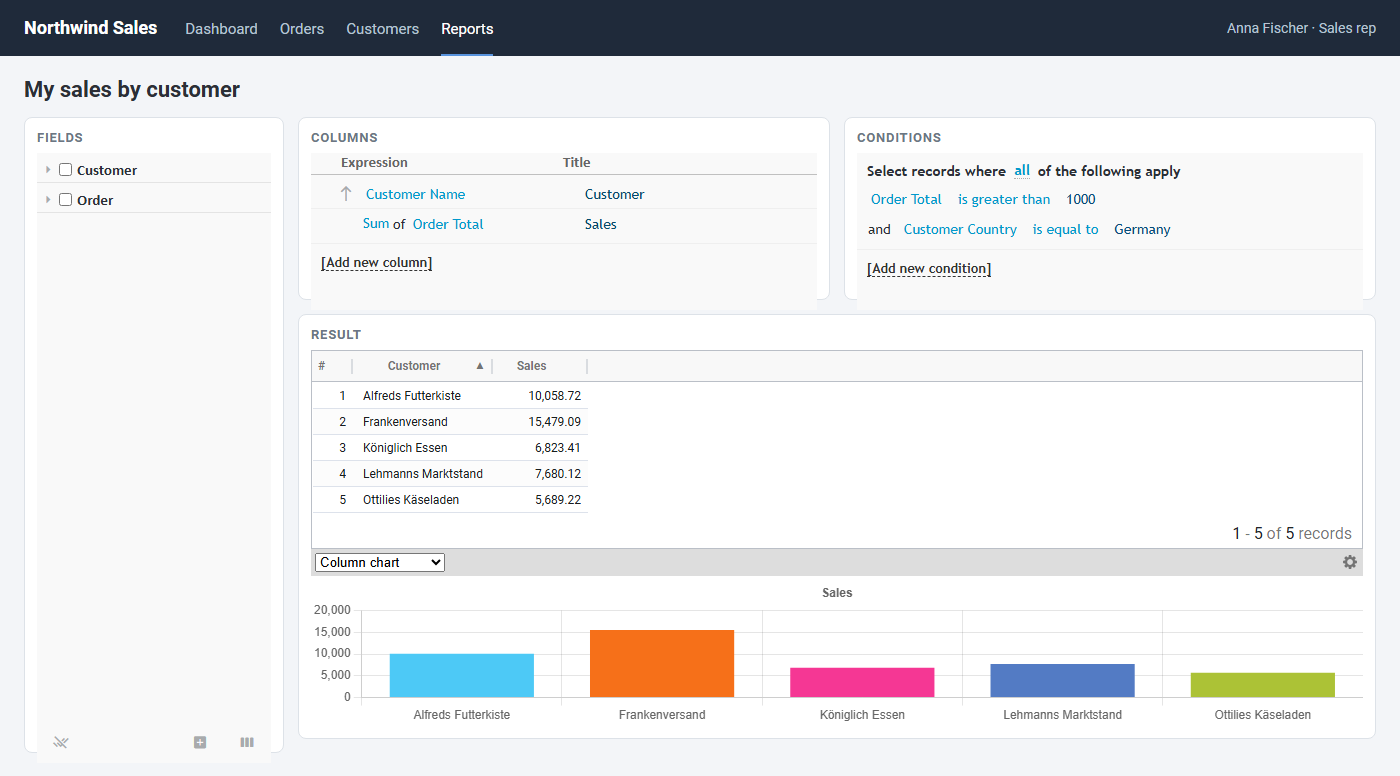
The view finds its widgets by ID, so the four <div>s can sit anywhere in your own layout and take your own CSS: the entity list, the column picker, the condition editor and the result grid. With Chart.js on the page and showChart set, the result panel also draws a chart of the result, as in the picture below.
4. Keep users inside their permissions
In a new app you can start with "everyone sees everything". In an existing one the rules are already there, and the query builder must not become a way around them. There are three separate questions, and each is answered in a different place.
Which tables and columns exist at all. The model is the outer wall: what is not in it cannot be selected, filtered on or joined through. Shape it on the classes themselves:
[EqEntity(false)]
public class AuditEntry { /* ... */ }

public class Customer
{
    // ...
    [EqEntityAttr(false)]
    public string? InternalNotes { get; set; }
}
or, for classes you cannot or would rather not annotate, with a filter on the loader, as with ApiKey above. In the model this project serves, AuditEntry and ApiKey are gone, and Customer has no InternalNotes at all, not even as a filter.
Who may do what.
options.UseDefaultAuthProvider();
This line matters more than it looks. Without an auth provider the EasyQuery endpoint performs no checks of its own: every action, including saving and deleting shared queries, is open to whoever can reach the URL. .RequireAuthorization() keeps anonymous users out; the default auth provider goes further. With it, every action needs a signed-in user, and creating, saving and removing queries also need the eq-manager role. Everyone else can build and run queries and open the saved ones, but cannot change the shared list.
Which rows. This is the rule existing apps always have and new ones rarely do: a sales rep sees their own orders, a tenant sees their own tenant. The query builder lets users write any condition they like, so the restriction has to be added on the server, to every query, where the user can neither see nor remove it:
options.AddQueryTunerWithHttpContext((manager, context) => {
    var userId = context.User.FindFirst(ClaimTypes.NameIdentifier)?.Value ?? "";

    var extra = manager.Query.ExtraConditions;
    extra.Conditions.Clear();
    extra.AddSimpleCondition("Order.SalesRepId", "Equal", userId);
});
The query tuner runs on every request, after the query arrives from the browser and before the SQL is built, and it gets the request's HttpContext. With it, a query for order totals comes out as:
SELECT "Orders"."Total" AS "Total"
FROM "Orders" AS "Orders"
WHERE
(
  "Orders"."SalesRepId" = 'rep-42' )
The value comes from the claims of the signed-in user, so whatever your app already puts there, a tenant ID or a region, can drive the filter. (If those values are not in the claims yet, adding extra user claims in ASP.NET Core shows how.)
That is the whole integration: two packages, a few lines in Program.cs, one page, and the three rules.
Extra info
Clear the extra conditions first. The tuner runs on every request, a query taken from the session cache included, and the cache keeps the query as it was before tuning, so the condition is never skipped and never carried over from another user. Conditions.Clear() keeps the tuner safe to run twice on the same query anyway, which costs one line. Conditions the browser sends of its own are added after the tuner, as a group joined to yours with AND, so they can only narrow the result.
When there is no request. If the tuner cannot get an HttpContext (a query run from a background job, or no IHttpContextAccessor registered), it does not quietly run the query without your condition: it throws, and the query is not executed.
Lists of values are separate. The tuner restricts query results. The drop-down lists of values in the condition editor are loaded by their own requests and do not pass through it, so keep columns whose values alone are sensitive out of the model or out of conditions.
A query tuner, not a pre-fetch tuner. EasyQuery also has AddPreFetchTunerWithHttpContext, and its name suggests the same job. It is not: pre-fetch tuners run after the SQL has been generated, so a condition added there never reaches the database. No error, no warning; users simply get every row. We learned that one the hard way. Whatever the hook, check a row-level rule by reading the SQL it produces: set options.ReturnQueryStatementOnFetch = true in development and the generated statement comes back with the result.
Rules per action. The default auth provider can require a role or a policy per action instead of the eq-manager default:
// excerpt
options.UseDefaultAuthProvider(provider => {
    provider.RequirePolicy("Reporting", EqAction.SaveQuery, EqAction.RemoveQuery);
});
Usable in conditions, not in the result. [EqEntityAttr] has UseInResult and UseInConditions, for a column users may filter on but not see, or the other way round.
Identity contexts. If your context derives from IdentityDbContext, use UseDbContextWithoutIdentity<T>() from the Korzh.EasyQuery.EntityFrameworkCore.Identity package, and the Identity tables stay out of the model.
The model ID names the saved queries' folder. DefaultModelId is the ID the page asks for, and the file-based query store keeps saved queries in App_Data/dm-<model ID>. Rename it later and the saved queries are in the wrong folder.
A page without markup. If you would rather see it working before writing any HTML, add the Korzh.EasyQuery.RazorUI package. It brings a ready-made page at /EasyQuery/AdvancedSearch that renders inside your own _Layout and talks to the same endpoint.
A read-only database user. The SQL runs with the permissions of your context's connection. A read-only login for the reporting endpoint costs little and limits what any mistake can do.
The license dialog. Until a license key is set, the page shows a No license dialog instead of the query builder. That is expected; a trial key removes it.
Links and next steps
- See it first. The live demos show the same widgets on a sample database: advanced search, ad-hoc reporting and data filtering.
- Run it on your machine. There is one sample repository per platform at github.com/easyquery; the ASP.NET Core Razor sample is closest to this article, and its README says how to point it at your own database.
- Read more. Getting started with ASP.NET Core in the EasyQuery documentation.
- Try it in your app. The EasyQuery page has more information on editions and licensing. You can get a trial key the first time you run your app.