EASYQUERY FOR SPAs

A query builder for your React, Angular, Vue or Blazor app

EasyQuery.JS gives your single-page application a visual query builder, a result grid and charts. Behind it: the EasyQuery ASP.NET Core backend, or EasyQuery Server on your own servers for any other backend.

EasyQuery.JS query builder, result grid and chart

WHAT YOU GET

YOUR FRAMEWORK

The widgets work in React, Angular, Vue, Blazor and plain web components, as well as in classic MVC or Razor pages. There are ready-to-run samples for each.

YOUR BACKEND

With ASP.NET Core, the EasyQuery backend does all the server work in one MapEasyQuery call. With any other backend, EasyQuery Server generates the SQL for you.

WRITTEN IN TYPESCRIPT

EasyQuery.JS is written in TypeScript and published on npm (@easyquery/core, @easyquery/ui), so you get type checking and IntelliSense even in plain JavaScript.

USER-FRIENDLY UI

All the complexity of SQL is hidden: users add columns and conditions in plain language and see the result at once.

HOW IT WORKS

With the EasyQuery backend

for ASP.NET Core, the usual path
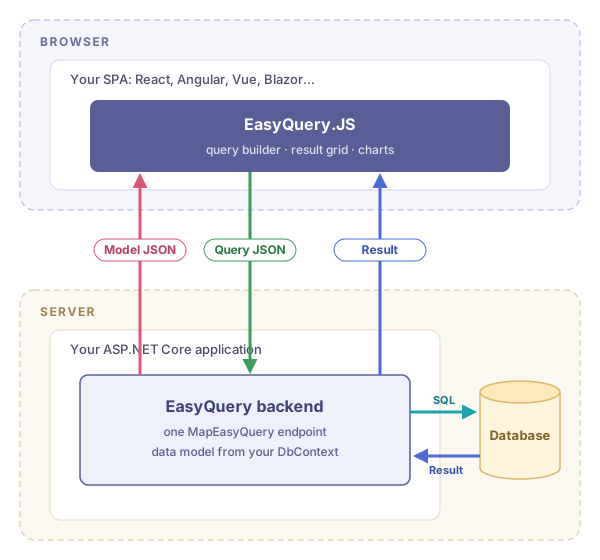
EasyQuery.JS with the EasyQuery backend in your ASP.NET Core application

With EasyQuery Server

for any other backend: Java, Node.js, PHP, Python…
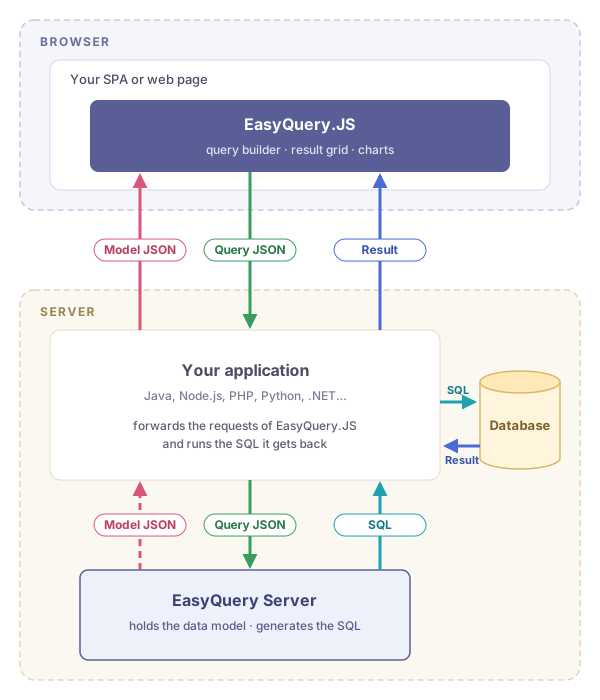
EasyQuery.JS with EasyQuery Server next to your backend
1
EasyQuery.JS (embedded in your page or component) requests the data model from your server-side application.

The data model defines which entities and attributes users can operate with when they build their queries, and how they relate to each other.

The ASP.NET Core backend builds the data model at run time from your DbContext or database. With EasyQuery Server, you create the data model with a special utility.

2

The user builds a query: adds or changes columns and conditions in the EasyQuery.JS UI.

EasyQuery.JS sends the JSON representation of the query to your application.

With EasyQuery Server, your application passes the query JSON on to the Server.

3

The query JSON becomes SQL.

With the EasyQuery backend, the EasyQuery code in your application does it.

With EasyQuery Server, the Server generates the SQL and sends it back to your application.

Your application runs the SQL against your database, under your own access rules.

4

Your application gets the result and sends it to EasyQuery.JS, which shows it in the grid or as a chart.

HOW TO START

A FEW LINES IN YOUR COMPONENT

From the React sample: the view, the backend endpoint, and that's it. The same with either backend below.

import { AdvancedSearchView } from '@easyquery/ui';
import '@easyquery/enterprise';

const view = new AdvancedSearchView();
view.getContext()
    .useEndpoint('/api/easyquery')
    .useEnterprise(() => view.init({
        loadModelOnStart: true,
        result: { showChart: true }
    }));

ASP.NET CORE BACKEND

Setting up the backend is easy: a few lines in Program.cs add the EasyQuery endpoint and connect it to your database through your DbContext. The data model comes from the same DbContext, so there is nothing else to describe.

builder.Services.AddEasyQuery()
    .UseSqlManager();
...
app.MapEasyQuery(options => {
    options.Endpoint = "/api/easyquery";
    options.UseDbContext<AppDbContext>();
});

To see it all working together, start from the sample for your frontend. Each one is a complete ASP.NET Core 10 solution, frontend and backend, that runs as soon as you open it:

EasyQuery.JS is included in the EasyQuery for ASP.NET Core license; you don't buy it separately. See the EasyQuery prices.

Documentation: getting started with ASP.NET Core · EasyQuery.JS docs

ANY OTHER BACKEND: EASYQUERY SERVER

EasyQuery Server (EQS) is a small web service that does the server-side work EasyQuery.JS needs: it holds the data model and generates the SQL. Your application only forwards the frontend's requests to EQS and runs the SQL it gets back.

EasyQuery Server comes with the EasyQuery.JS Company license, so you can install it on your own servers. It runs on .NET: on Linux, Windows or macOS, and in Docker.

There is also a public EQS instance on SqlQueryBuilder.com. It is free, but has some limitations.

Sample projects for Node.js and PHP are available on GitHub. If you need a sample for your platform of choice, please contact us.

EASYQUERY.JS PRICE

For ASP.NET Core, EasyQuery.JS is part of the EasyQuery license. The prices below are for EasyQuery.JS with another backend.

EASYQUERY.JS

Community
Free
Company
$999
Features GET SAMPLES BUY NOW
Number of Developers Unlimited Unlimited
Number of projects allowed Unlimited Unlimited
Unminified source files
Required "Powered by" tag
Limited functionality
Premium support
Non-exclusive lifetime license
Free access to public EasyQuery Server*
EasyQuery Server on-premises

* The public EasyQuery Server has some limits on server load.

FREQUENTLY ASKED QUESTIONS

Do I need to pay any additional fees per domain, per user, etc.?

No. The license price is final, with no additional fees. Once you have purchased EasyQuery, you may use it in any number of your projects for any number of end users or site visitors. There are NO deployment limitations.

We provide annual subscriptions for our products to give you access to the latest releases and support.

What forms of payment do you accept?

We accept payments via credit card, check, PayPal, wire transfer and other methods. You can select your preferred payment method on the order form.

How can I get a quote?

Click the appropriate "Buy Now" button in the table above to open the order page. At the end of that page, you will find a "Get Quote" button. Fill out the form and press this button to get a quote.

What is a subscription?

The subscription is an annual fee that gives you access to the latest releases and support. A valid subscription allows you to download new versions of the product. When a new version is released, you don't need to pay for the upgrade — just download it from our Members Area.

The first year of subscription is included in the license price.

With an expired subscription, you will no longer have access to new releases and support. You can renew an expired subscription (the so-called "welcome back" renewal), but it will cost you more than twice as much.

How much does the subscription cost? How can I purchase it?

The 1-year subscription renewal costs about 25% of the license price for those who renew the subscription on time, before the expiration date. There is also a "welcome back" price, about 70%, for those who are late.

To purchase the subscription, go to your account page, sign in, find the "Licenses" panel and click the "Renew" link to the right of the license.

To get the lower price, renew your subscription before its expiration date. You can find the expiration date on the Licenses page of our Members Area. We will also remind you several times by e-mail.

Can I continue using EasyQuery when my subscription expires?

Yes, you can. Your EasyQuery license is perpetual. However, you will be using the last product version released before your subscription expired.

If you choose not to renew your subscription, you will no longer have access to new releases and support, and we will be very sad.

How do the licenses work?

Your license is tied to your Korzh.com account.

To get the full (registered) copy of EasyQuery, simply log in to your account page and download the latest version of the product.

What about support?

We offer first-class online support to help you succeed. You can open a support ticket on this page.

Do you have a money-back guarantee?

We provide the full-featured Community edition for free. We hope you try it for a while so you can make an informed decision before purchasing the product.

The Company license includes the source code, so we cannot offer a money-back guarantee on it. Please note: the Company license is non-refundable!

We are resellers. Do you have any special offers for resellers?

Yes, we do. See the resellers' FAQ for details.

HAVE MORE QUESTIONS?

Don't hesitate to contact us; we are eager to assist with any inquiries.